
CRT Basics
2025-07-16

I’m beginning to ponder how the 1972 game of Pong worked. (I expect to dribble notes about my revelations as I increase my understanding).
The game was built entirely using ICs and used no software. It is massively parallel but could use better “structuring” - whatever that means (I hope to discover what that means).
The game circuitry was attached directly to a CRT and controlled all aspects of the display.
In this article, I will discuss the very basics of what a CRT does and sketch and loosely describe how a CRT works. Knowing how a CRT works is necessary for understanding why the Atari Pong circuitry was designed as it was.
CRT
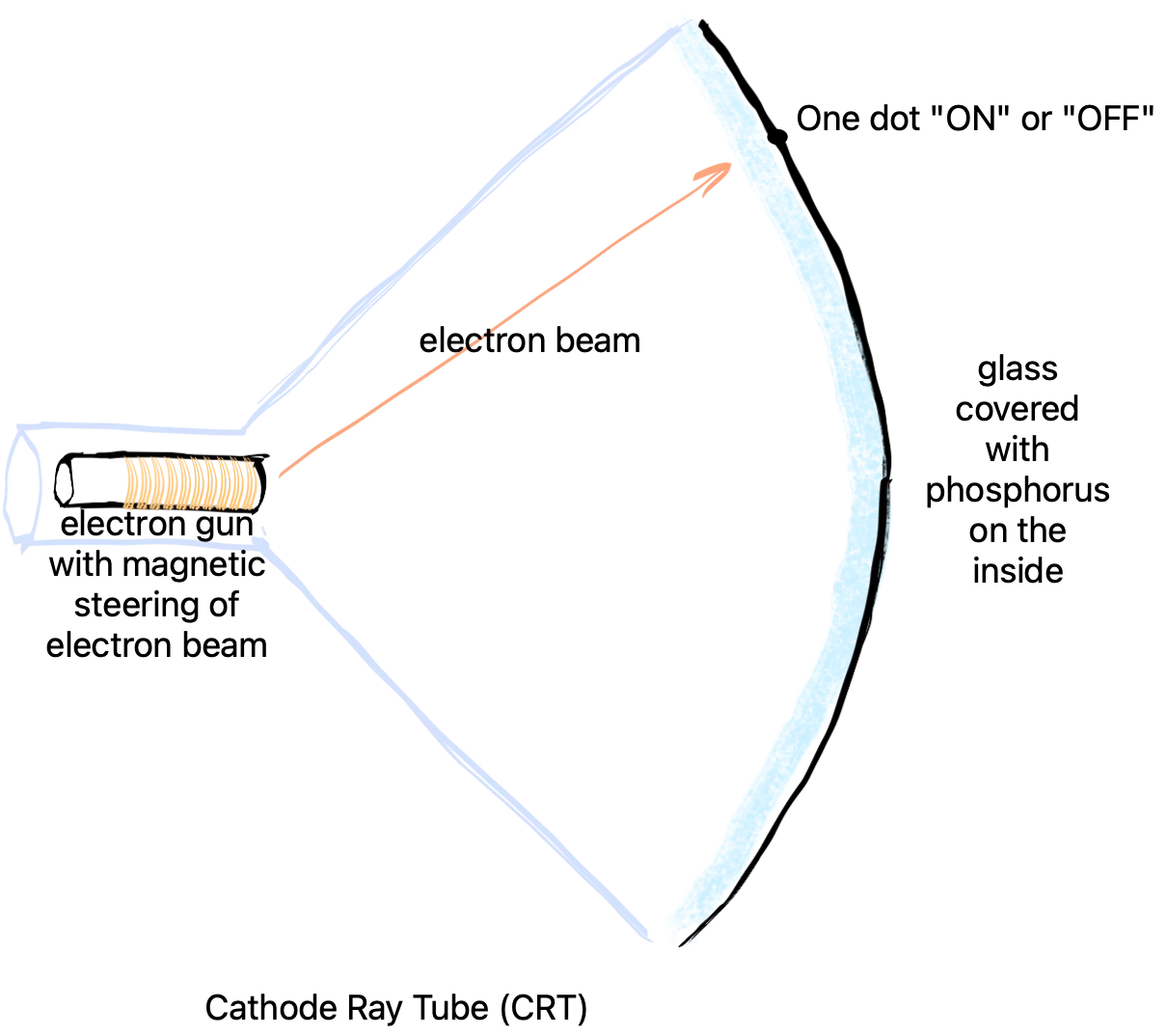
A CRT - Cathode Ray Tube - is just a large pyramidally-shaped, hollow glass tube. People, located outside of the tube, see pictures on the base end of the pyramid.
The inside of the glass tube’s base is painted with phosphorus. When the phosphor is in it’s normal state, it appears to be a very dark grey / black colour. When the phosphor is raised to an excited state by hitting it with electrons, the phosphor glows white and slowly decays back to black over a few milliseconds.
This means that pictures can be drawn onto the phosphor of CRTs using an electron beam, but, if you wanted the picture to glow long enough for humans to see it and to perceive it as a picture, you have to keep hitting the phosphor with the same picture over and over again many times a second. In North America, the standard idea is that you have to update the picture 60 times a second. In Europe, the standard is 50 times a second, iiuc.
Only one electron gun is used to create a very narrow beam of electrons. The beam shoots electrons at the phosphorus to make a single glowing dot on the screen. The beam is swept across and down the screen (the pyramid base) 60 times a second. The sweeping is done in a column / row manner. The electron beam would be rapidly turned on and off to display small, glowing dots on the screen. Horizontal, left to right sweeps display dots that make up one row (one “raster”) of the final picture. After a complete row is displayed, the beam moves down a bit and displays the next row of dots. 525 such rows are need to show a complete picture (only 480 rows actually contain visible information). There are 720 columns in this scheme. NTSC works in two passes - only every 2nd row is shown on the first pass, then every other row is shown. This is called “interlacing”. One complete pass is done in 1/60th of a second. Two passes takes 2/60ths of a second, or 1/30th of a second, or 30 frames per second.
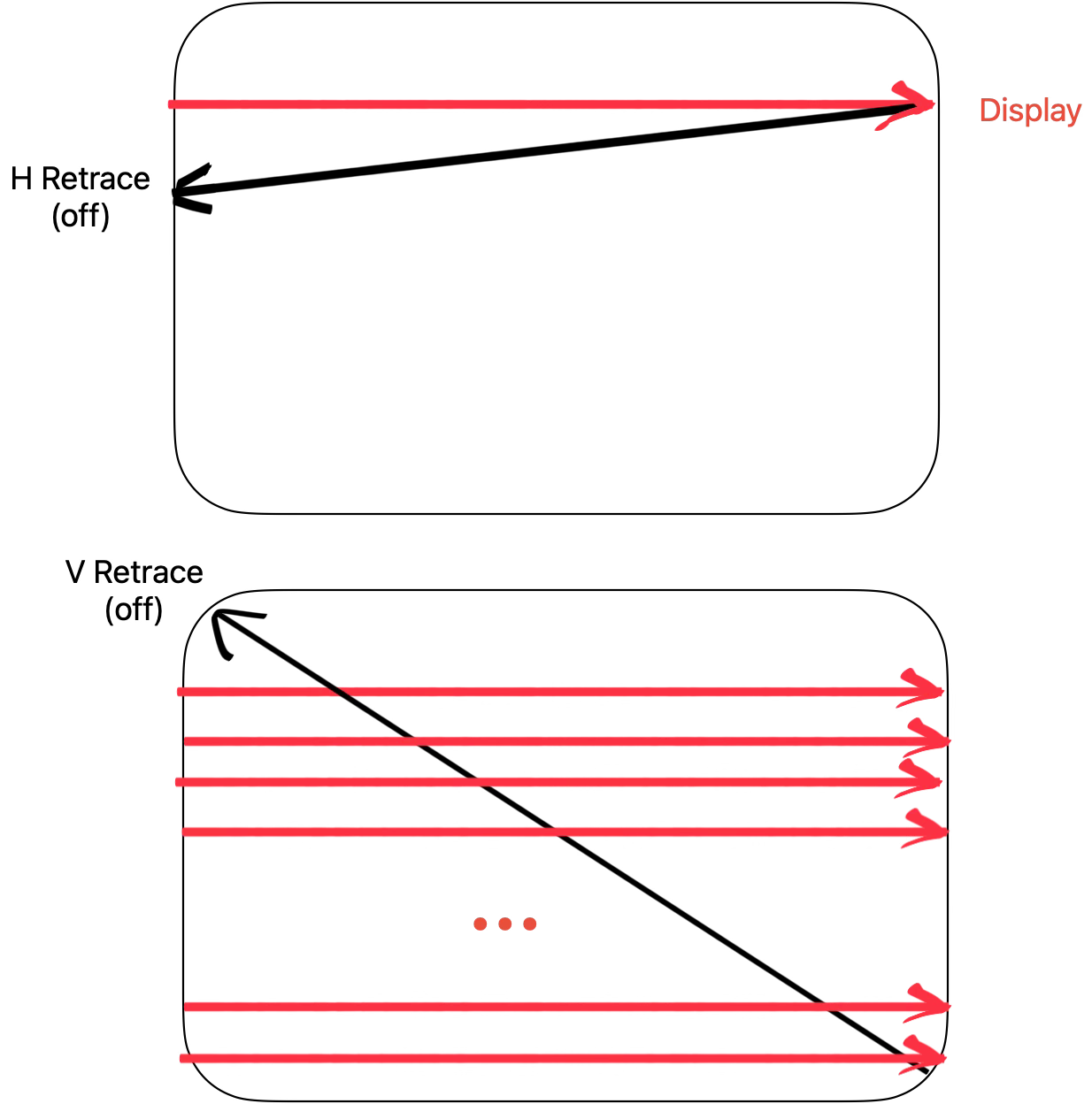
The electron beam snaps back to the left side or back to the top. This is called “retracing”. Horizontal retrace is marked by an “hsync” pulse and vertical retracing is marked by a “vsync” pulse. During retrce, the beam is off. Most early games did most of their work during the “vertical retrace” time. It takes longer to snap the beam back from the bottom right to the top left of the display than it takes to snap the beam back from the right side of a row back to the left side of the next row.
Asides
For the record, the colourized schematic for 1972 Atari Pong is this. I don’t grok all of the details yet and expect to dribble out my revelations as I go (volunteers, comments, revelations welcome - anything that saves me time and brain power). The ultimate goal, for me, is to build Pong in PBP (0D).
This technique is called “composite video”. A good explanation of how this works can be found in this video. I’ve simplified the above description by imagining that the electron beam is a simple, digital signal that is either “ON” or “OFF”. Composite video for CRTs actually uses analogue signals to control the intensity of each on-screen dot. Composite video is actually more nuanced than just simple ON and OFF digital states.
See Also
Email: ptcomputingsimplicity@gmail.com
References: https://guitarvydas.github.io/2024/01/06/References.html
Blog: guitarvydas.github.io
Videos: https://www.youtube.com/@programmingsimplicity2980
Discord: https://discord.gg/65YZUh6Jpq
Leanpub: [WIP] https://leanpub.com/u/paul-tarvydas
Twitter: @paul_tarvydas
Substack: paultarvydas.substack.com